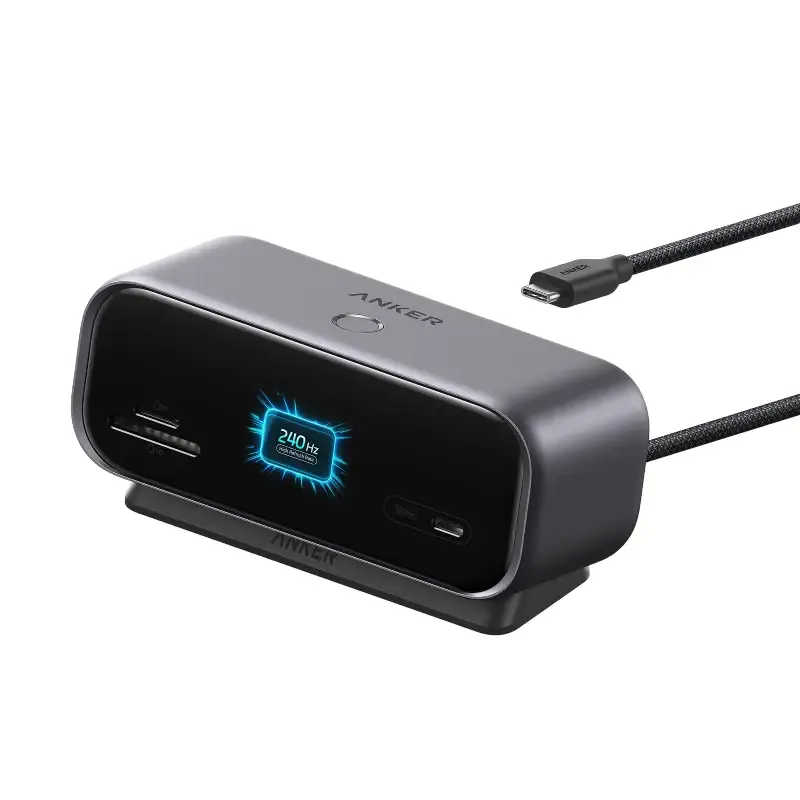

Anker 10-in-1 Desktop USB-C Hub (Model A210C)
- 10-in-1 desktop USB-C hub with display, data, Ethernet, and memory card connections
- Supports up to 10Gbps data transfer and up to 80W host charging with a 100W PD charger
- Works with USB-C laptops that support Power Delivery, DisplayPort, USB4, or Thunderbolt 3/4/5
- Dual-monitor support depends on the host device; macOS mirrors both external displays
Specifications
Anker 10-in-1 Desktop USB-C Hub (Model A210C)
| Brand | Anker |
| Product Type | USB Hubs |
| Model | A210C |
| Connectivity | 10-in-1 |
| Data Transfer Rate | Up to 10Gbps |
| Video Output | HDMI and DisplayPort |
| Display Support | Up to 4K@144Hz single display; up to 4K@120Hz or 2K@240Hz dual display |
| Host Charging | Up to 80W |
| Power Input | Up to 100W via USB-C PD-IN |
| Compatibility | Windows 10/11 and macOS; compatible with laptops supporting Power Delivery, DisplayPort 1.2/1.4/2.1, USB4, or Thunderbolt 3/4/5 |
| Ports | HDMI, DisplayPort, USB-C, USB, Ethernet, microSD |
| Dimensions | 130 x 50 x 55.6 mm (W x H x D) |
| Weight | 330g |
| Package Dimensions | 159 x 116 x 66 mm |
| Package Weight | 78g |
Description
Anker A210C Desktop USB-C Hub for a cleaner desk setup
The Anker 10-in-1 Desktop USB-C Hub (Model A210C) is built for laptop users who want one hub to handle displays, data, wired networking, and memory cards from a single USB-C connection. It is a better fit for a desk setup than a basic travel hub, especially if you want rear-facing ports and a built-in display for at-a-glance status.
10-in-1 connectivity
This hub brings together display output, USB data ports, Ethernet, and SD/microSD card support in one unit. That makes it useful if you regularly move files, connect accessories, or want a more organized work area with fewer separate adapters.
Dual-display support with limits
The hub supports external displays through HDMI and DisplayPort, with up to 4K at 144Hz on a single display and 4K at 120Hz or 2K at 240Hz on dual displays according to the official product information. On macOS, the two external monitors mirror the same content, and USB-C monitors are not supported.
Built-in smart display
Anker says the 2-inch TFT screen can show live charging wattage, transfer speed, temperature status, and port occupancy. It also includes a physical control button and is meant to help you check hub status without opening another app or digging through menus.
Desk-friendly power and layout
The hub has a compact upright body, rear-facing ports, and a magnetic base for a more stable desktop setup. Anker also notes that the charger is not included, and for best performance you should use a 65W or higher USB-C charger.
Compatibility and setup checks
Before ordering, make sure your laptop has a full-function USB-C port with Power Delivery, DisplayPort 1.2/1.4/2.1, or USB4/Thunderbolt 3/4/5 support. The official compatibility notes also state that it works with Windows 10/11 and macOS, but not Linux.
The USB-A ports and the front USB-C port are for data transfer only. If you need charging or video output from that same port, this model will not do that, so it is best chosen for buyers who want a desktop dock rather than a simple USB splitter.
See more products in the USB Hubs category.
Shopping help: Warranty Policy, Return & Refund Policy, Shipping Information, Track Your Order.
Why Choose ShopZ?
100% Original Products
All products are genuine and sourced directly from authorized distributors
Fast Nationwide Delivery
Quick delivery across Bangladesh with real-time tracking
Easy Returns
7-day easy return policy for your peace of mind
Warranty Assured
Official warranty on all eligible products
Cash on Delivery
Pay when you receive - no advance payment needed
24/7 Support
Our support team is here to help anytime